Nyquist Player
Your music, played correctly.
A native music player for local and NAS libraries. Browse fast, play albums gaplessly, connect a USB DAC, and see what happens across your audio signal path.
Free · No account · No tracking
- FLAC
- ALAC / AAC
- MP3
- AIFF / WAV
- Ogg / Opus
- DSD (DSF/DFF)
- See all formats
Built for people who care about the samples.
A local music player should make your library easier to browse, preserve the way albums flow, and tell you what reaches the output. Nyquist does that without accounts or a streaming catalog.
What you notice first
-
Your library shouldn't feel slow.
Browse local drives, external SSDs, and NAS libraries without waiting for a full scan. Nyquist discovers folders asynchronously and loads metadata in the background, so large collections stay responsive.
-
Albums should play like albums.
Gapless playback keeps consecutive same-format tracks continuous, without inserting an artificial pause. Live recordings, classical works, and continuous mixes keep their intended flow.
-
Know what happens to your audio.
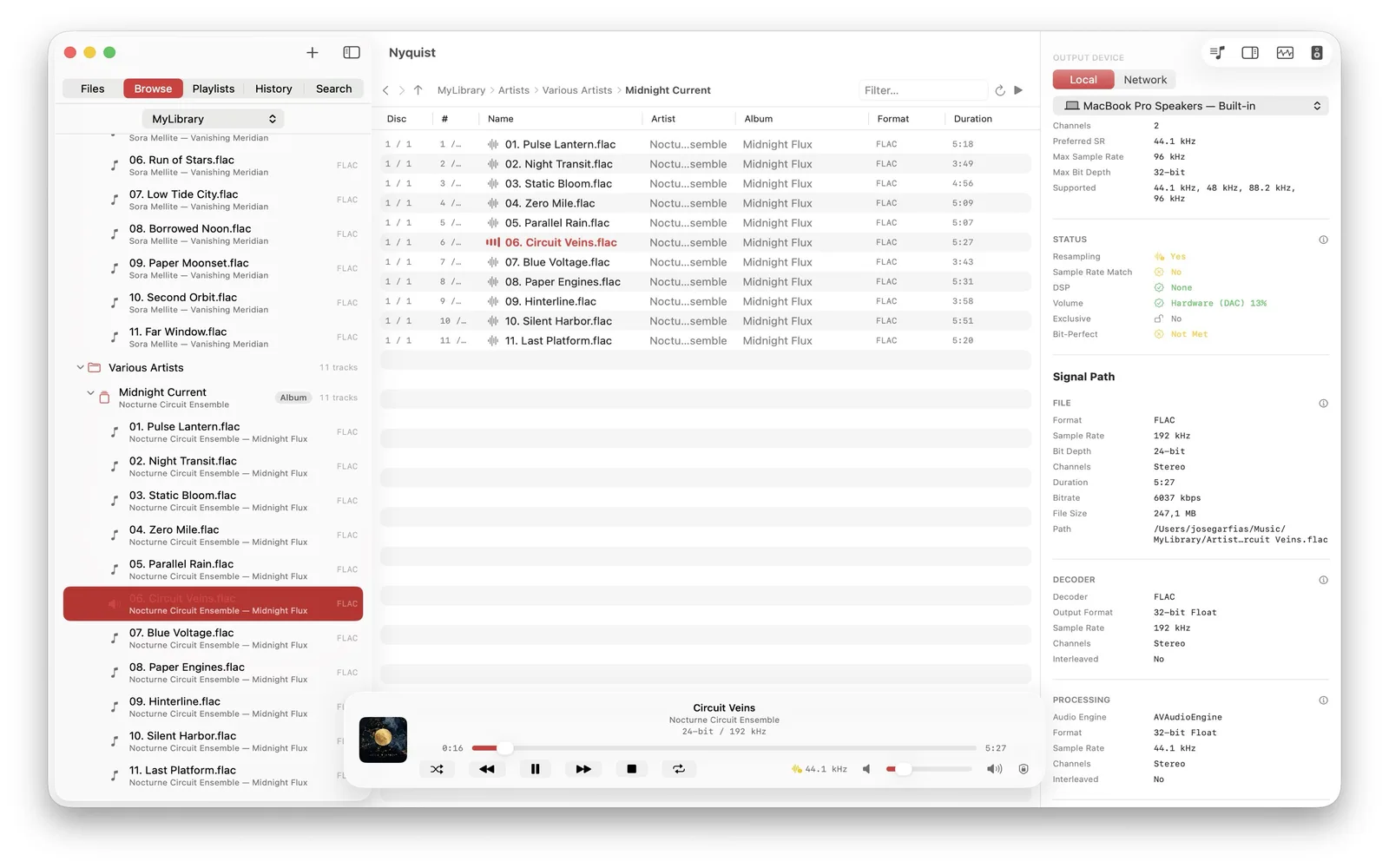
See the source format, processing path, output rate, resampling state, and exclusive-mode status. On Mac, choose a specific CoreAudio output or compatible USB DAC.
-
Play your files as files.
FLAC, ALAC, WAV, AIFF, MP3, AAC, Ogg, Opus, and DSD each keep their real identity. Nyquist shows codec, sample rate, bit depth, and channels without implying that bigger numbers are automatically better.
-
Your music stays yours.
No account, listening history, analytics, advertising profile, or cloud music library. Files, metadata, and the search index remain on your devices.
Go deeper
Tools for listening, routing, and understanding.
-
LAB Track analysis
Inspect waveform, peak, RMS, dynamic range, EBU R128 loudness, ReplayGain, spectrum, spectrogram, bandwidth, live meters, and stereo position, with plain-language context.
-
NAS NAS-aware playback
Add SMB shares directly or through Files. Playback starts while Nyquist caches the current track locally, then prefetches the next track for responsive seeking and rotation.
-
DSD DSD, with clear limits
On macOS, DSF and DFF can travel as DSD over PCM to a compatible USB DAC. Compatible network receivers can receive the original file. Local DSD playback is unavailable on iPhone, iPad, and Apple TV.
-
EX Exclusive mode and routing
On macOS, select the exact CoreAudio output and optionally take exclusive ownership of a DAC. Nyquist remembers the device and falls back safely if it is disconnected.
-
LAN Network play (UPnP/DLNA)
Discover compatible receivers and send the original file without transcoding. Format support and final processing depend on the receiver; gapless hand-off works where the receiver supports it.
-
FIND On-device search
Search saved locations by file type, title, artist, album, genre, composer, label, year, or format. The persistent index never leaves your device.
-
MAP Library topology
Turn folders into a browsable map of artists, albums, EPs, singles, live sets, compilations, box sets, and discs without replacing your folder structure.
-
VOL Output-aware volume
Use system volume on iPhone and iPad, hardware or software gain on Mac, and receiver volume for network playback. An optional limiter helps prevent sudden loud jumps.
-
M3U Portable playlists
Store playlists as standard
.m3u8files in a local or NAS folder. Point each device at the same folder to keep playlists available across Mac, iPhone, and iPad.
23 recognized file extensions
Your library does not need one format.
Nyquist discovers every format below and probes the codec inside whenever possible. Container extensions such as M4A and Ogg are not treated as promises about the audio they contain.
-
FLAC
Local PCM path.flac
Lossless FLAC playback with track analysis.
-
MPEG-4 Audio
Local PCM path.m4a.m4b.m4r.alac
AAC, ALAC, or PCM, detected from the file when possible.
-
MP3 & AAC
Local PCM path.mp3.aac.adts
MP3 and raw ADTS AAC playback with track analysis.
-
AIFF & WAVE
Local PCM path.aif.aiff.aifc.wav.wave
AIFF, AIFC, and RIFF WAVE, including their commonly used PCM payloads.
-
Wave64, CAF & AU
Local PCM path.w64.caf.caff.au.snd
Wave64, Core Audio Format, and AU/SND when Core Audio supports the file's payload.
-
Ogg family
Local PCM path.ogg.oga.opus
OGG and OGA files may contain Vorbis, Opus, or FLAC audio streams which Nyquist supports through its local PCM path when Core Audio can decode them.
-
DSD
macOS DoP.dsf.dff
DSD over PCM on macOS with a compatible external DAC. Local DSD playback is not available on iPhone, iPad, or Apple TV.
Compare format and platform support
Not currently supported
Outside the local decoding path.
Apple does not provide the native decoding path Nyquist relies on for these formats. Supporting them requires custom decoding or a library such as FFmpeg, and that cost currently outweighs user demand. Nyquist can revisit them if users need them.
-
MMF / SMAF
Unsupported.mmf
Apple provides no native SMAF decoder. Its Yamaha ADPCM audio would require custom decoding or FFmpeg.
-
WMA / ASF
Unsupported.wma
Apple provides no native WMA decoder. Unprotected files need an ASF/FFmpeg path; DRM-protected files would remain unavailable.
-
SACD ISO
Unsupported.iso
An SACD ISO is a disc image with virtual tracks. Custom parsing, DST decoding, and licensing are required; extracted DSF/DFF files work today.
A desktop-class player, screenshot by screenshot.
Real captures from Nyquist — pick a platform to see how the file browser, live signal path, now-playing screen, playlists, and track-analysis lab look on Mac, iPhone, and iPad.
-
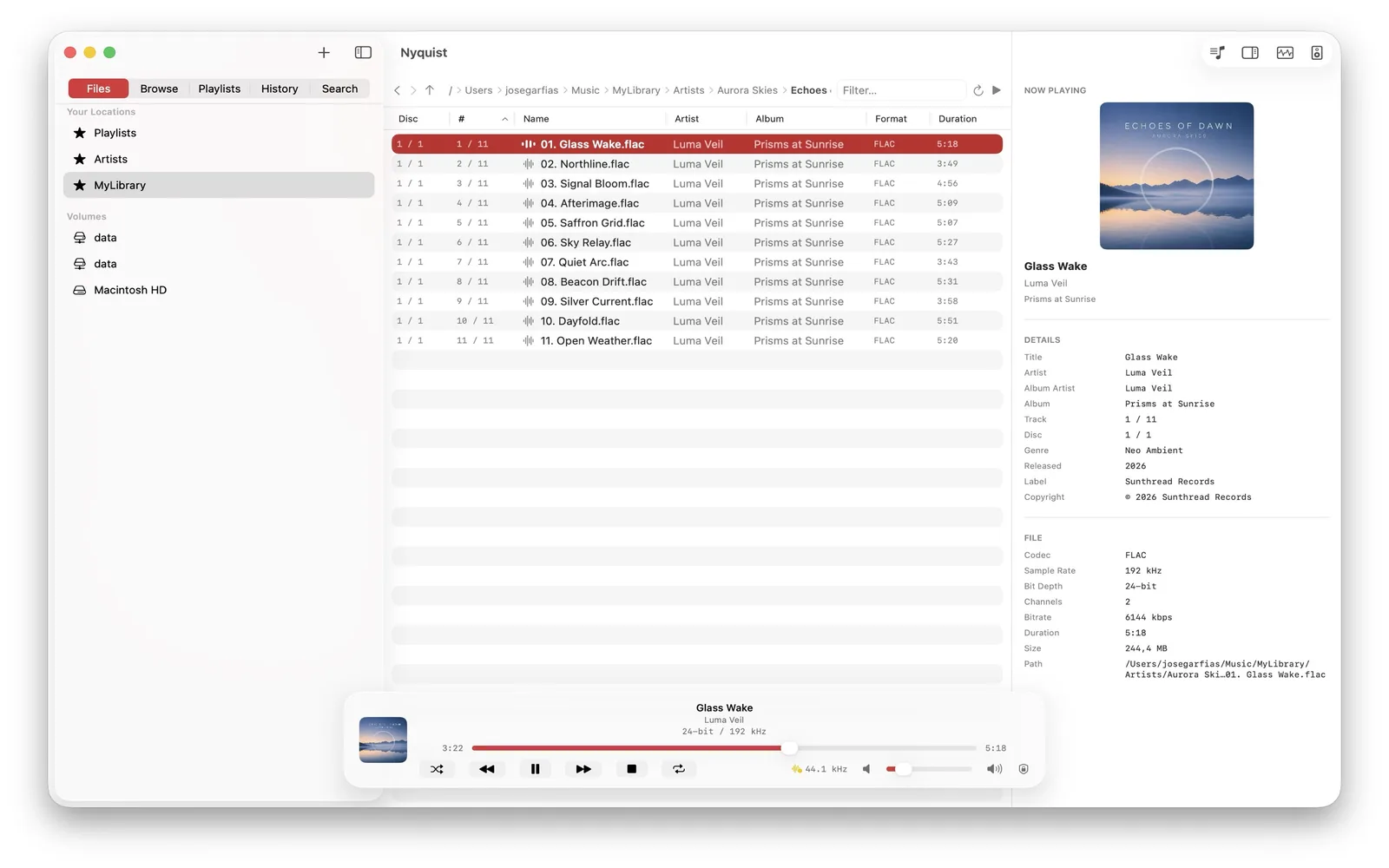
Folder-first browsing Navigate huge local and NAS libraries like a high-performance file browser. -
Inspectable signal path Pick the exact output device and verify sample-rate matching, exclusive mode, and live DAC status. -
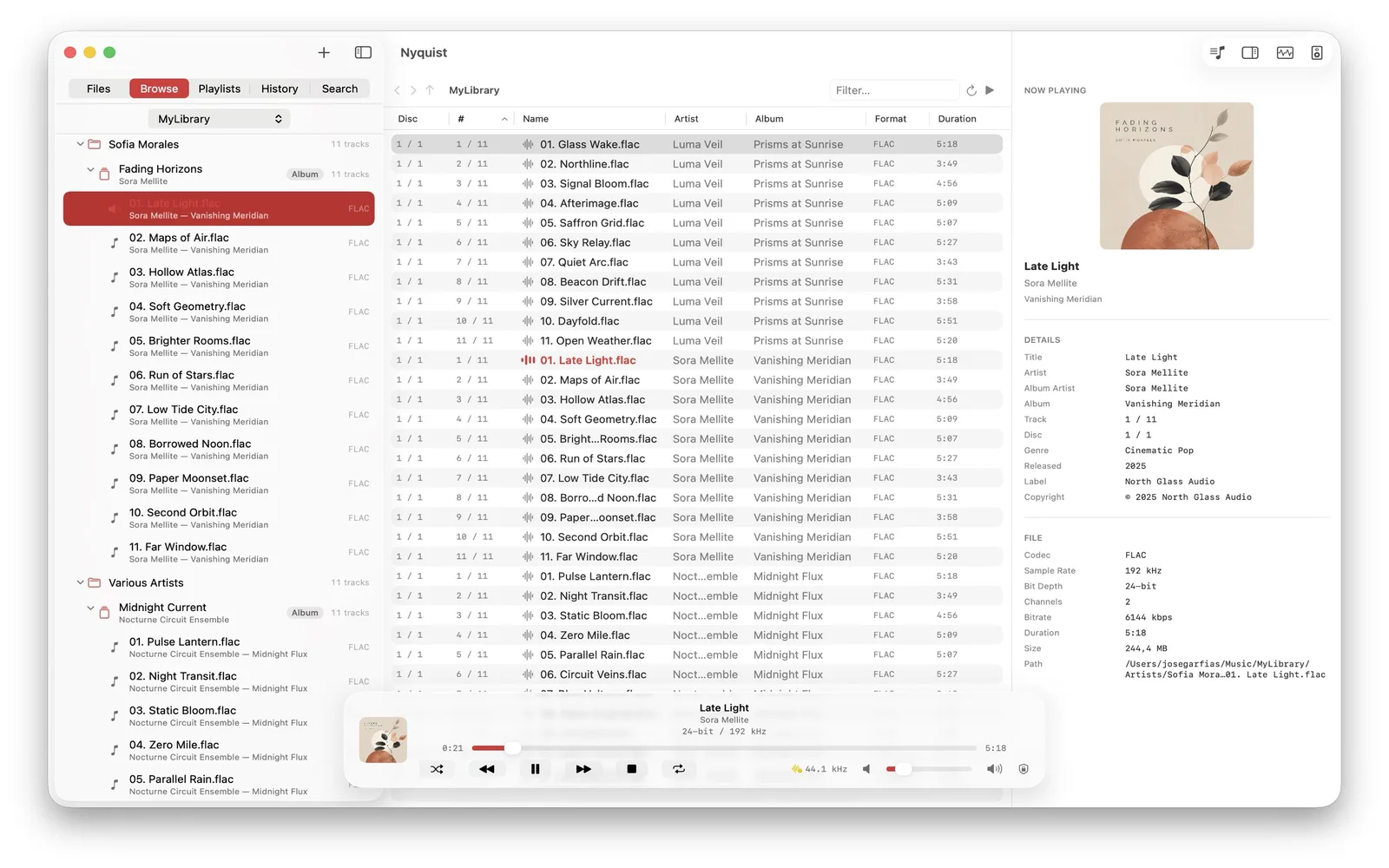
Now-playing inspector Cover art plus complete metadata and file details for the current track. -
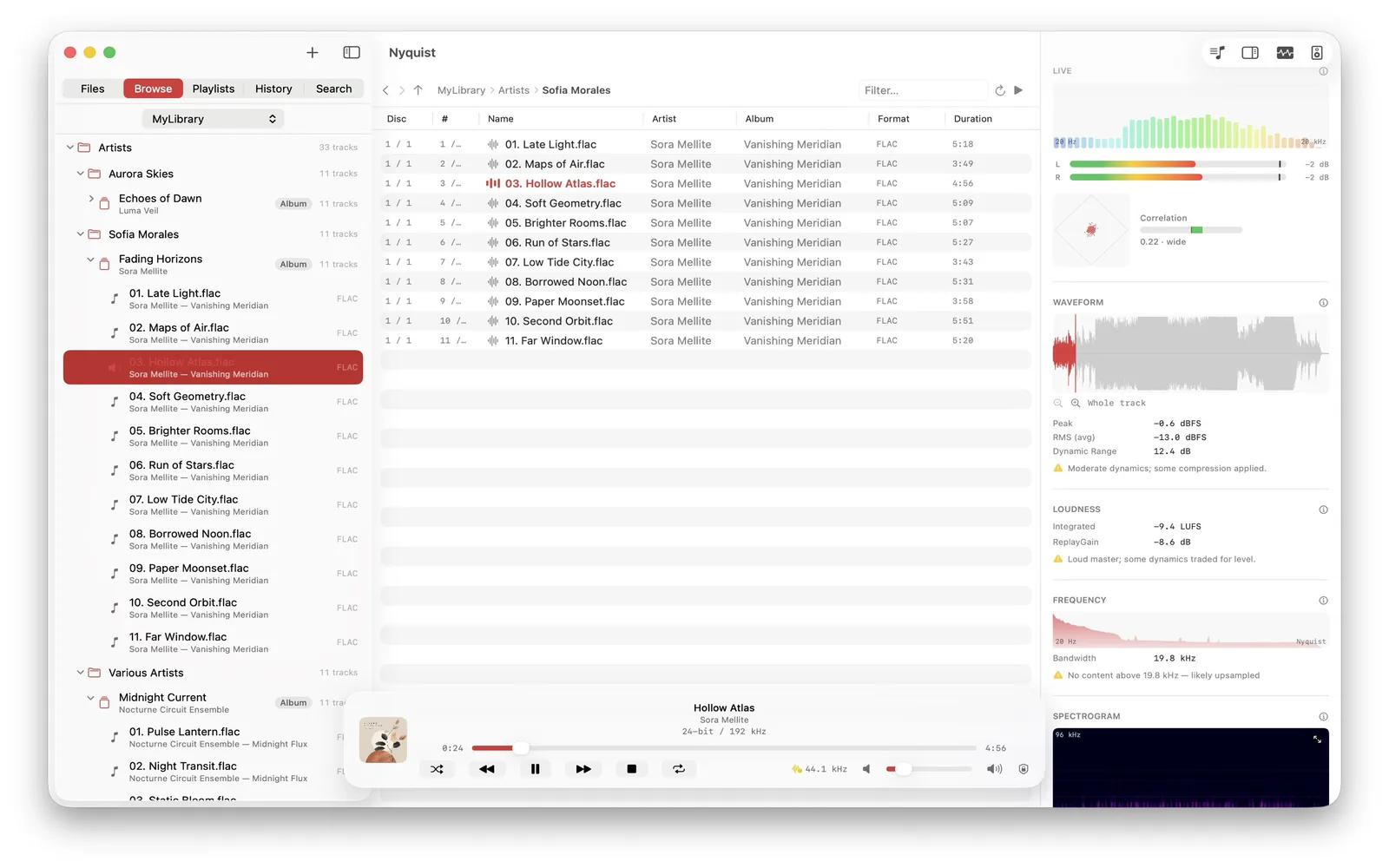
Track analysis Waveform, loudness, ReplayGain, bandwidth, and a full spectrogram — per file. -
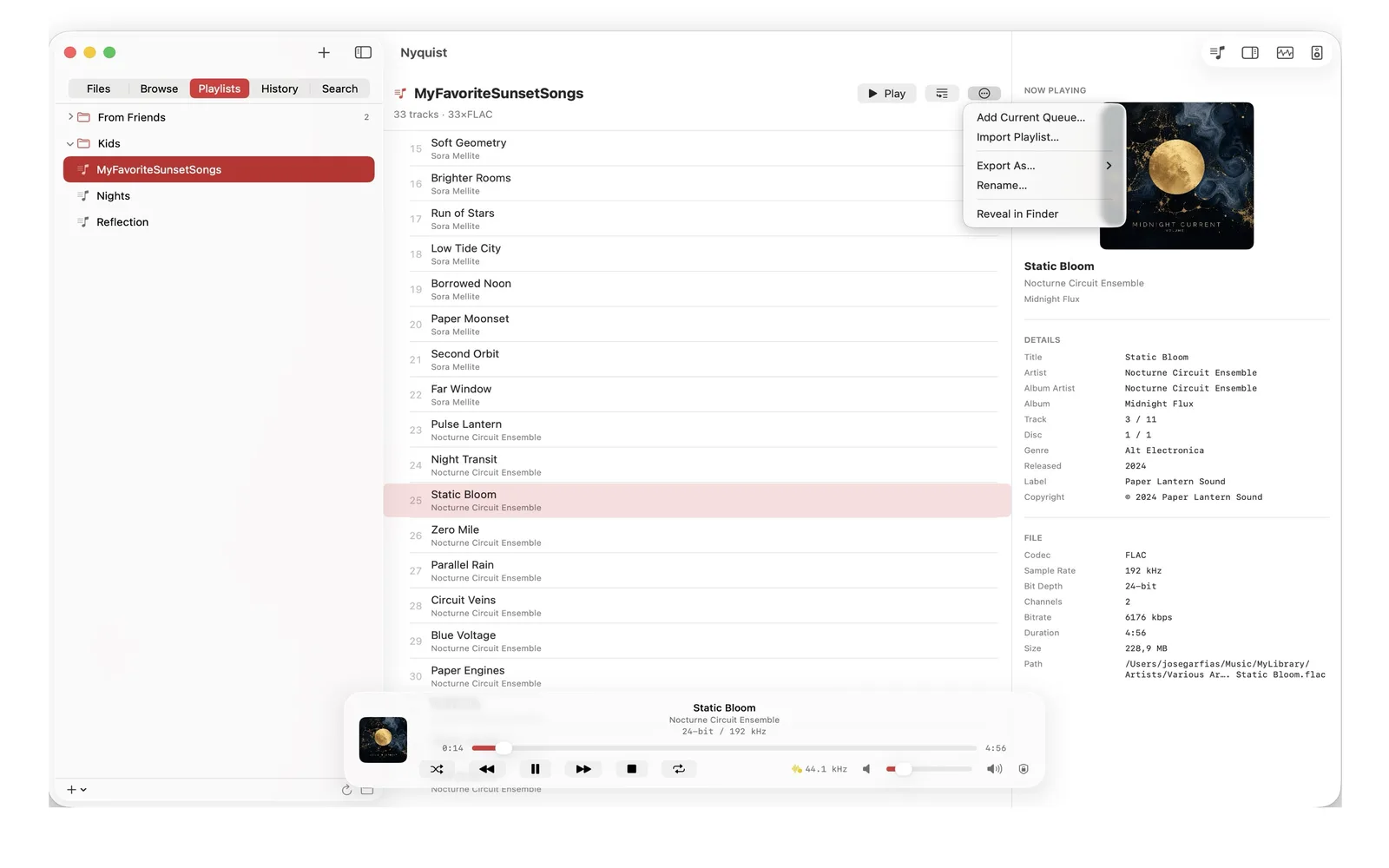
Playlists Portable .m3u8playlists in a folder you choose — build, reorder, and export them anywhere. -
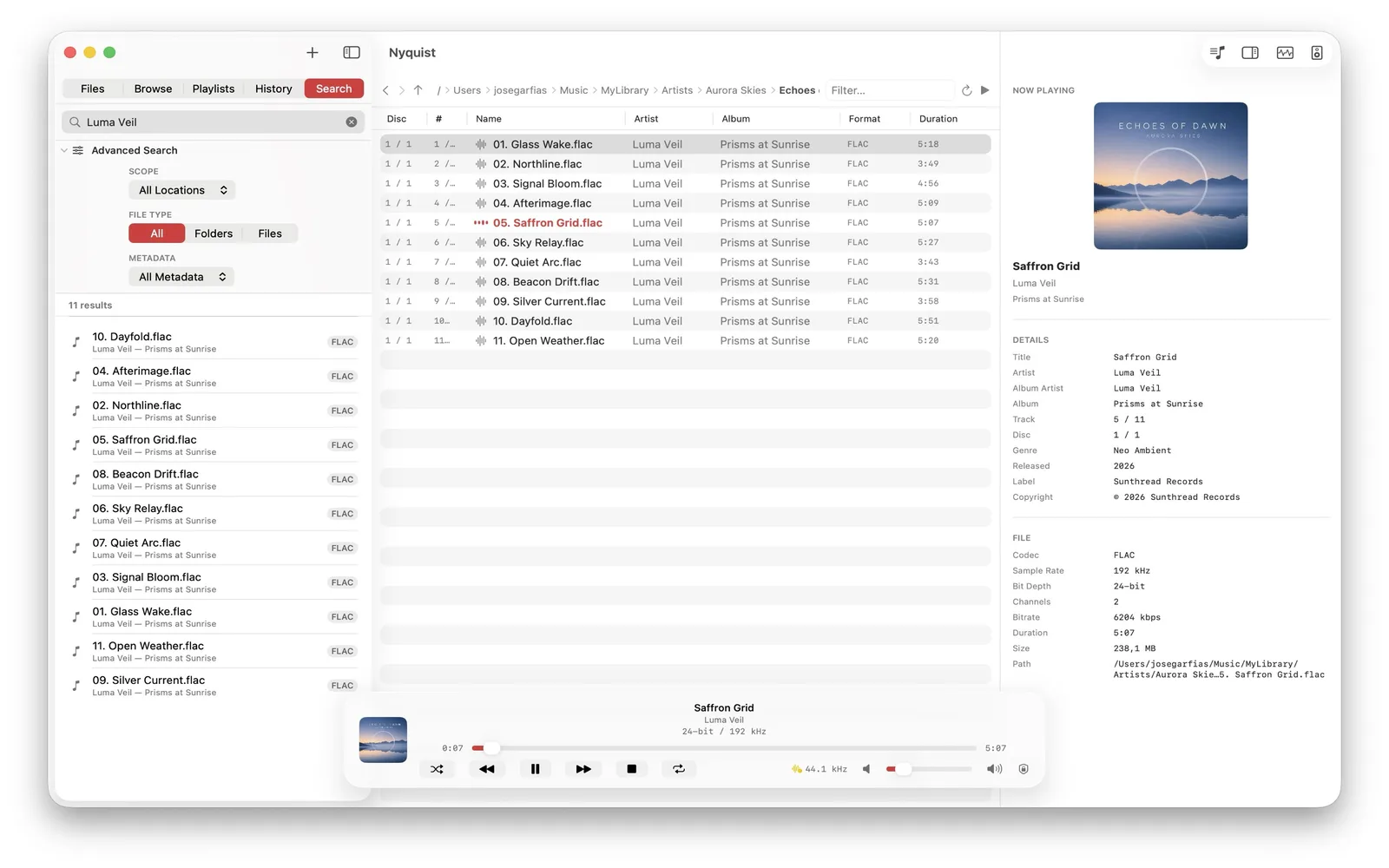
On-device search A private, instant index of your library with metadata-aware filters.
-
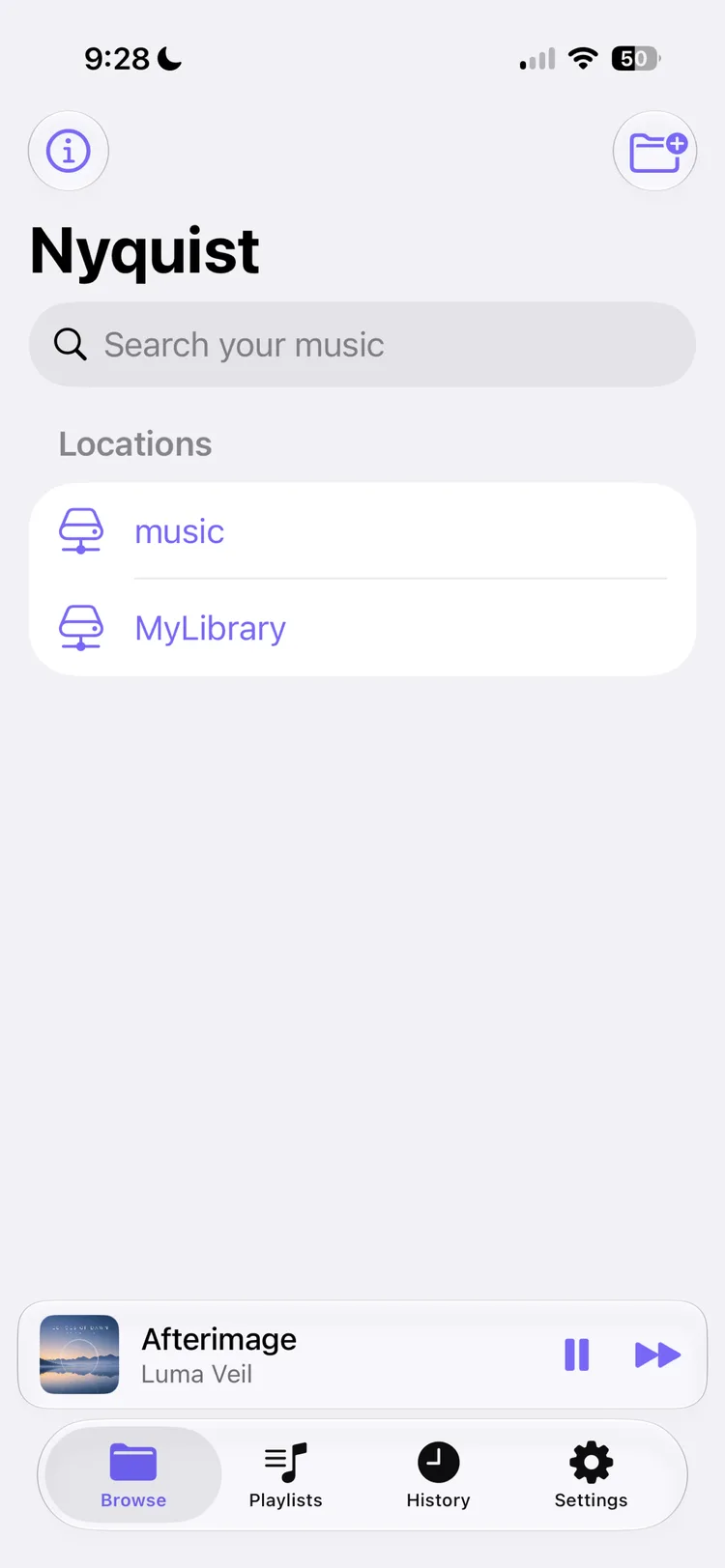
Your locations Saved local and NAS locations with instant search, right on the home screen. -
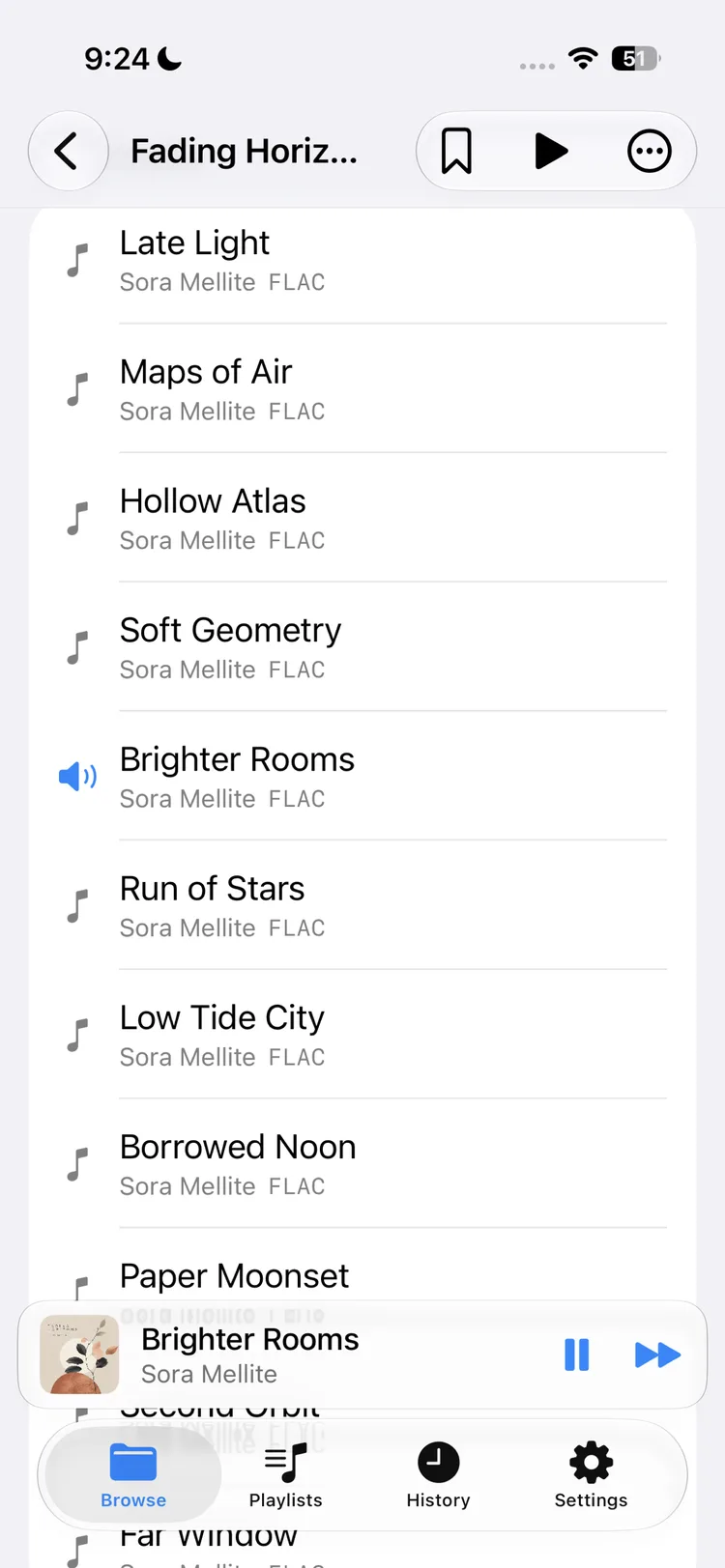
Folder-first browsing Tap through albums and folders with a pinned mini player and tabbed navigation. -
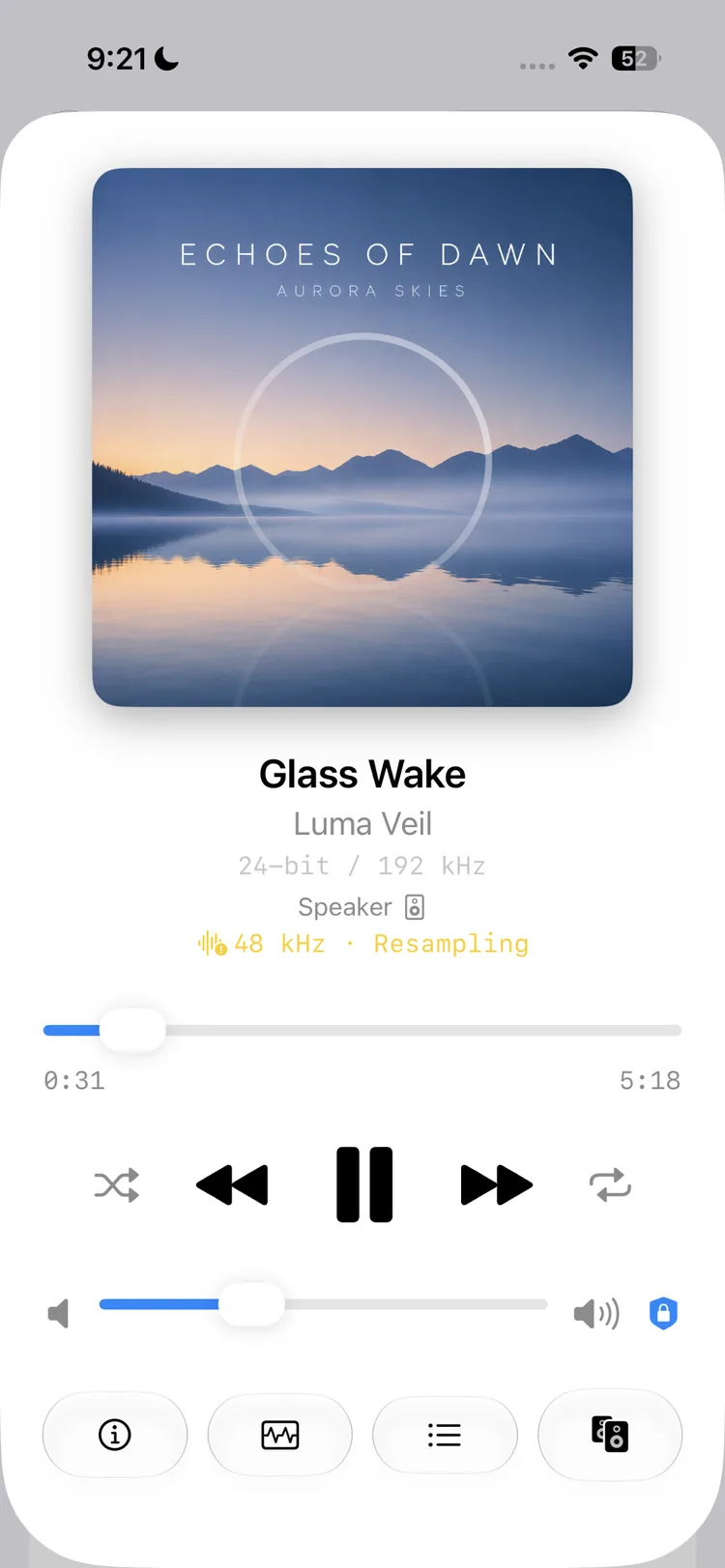
Now playing A full now-playing screen with format, output route, and resampling status. -
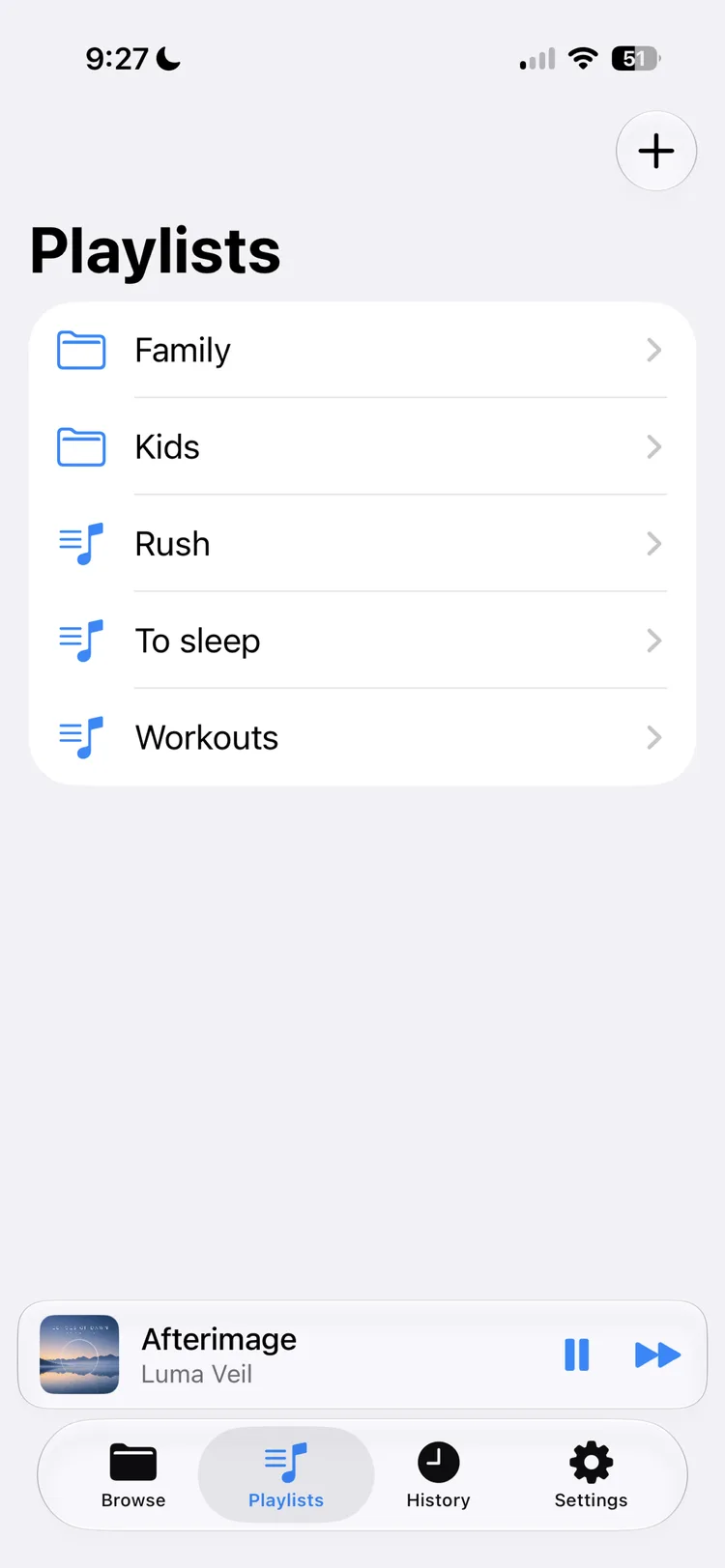
Playlists Manage portable .m3u8playlists that stay in sync across your devices. -
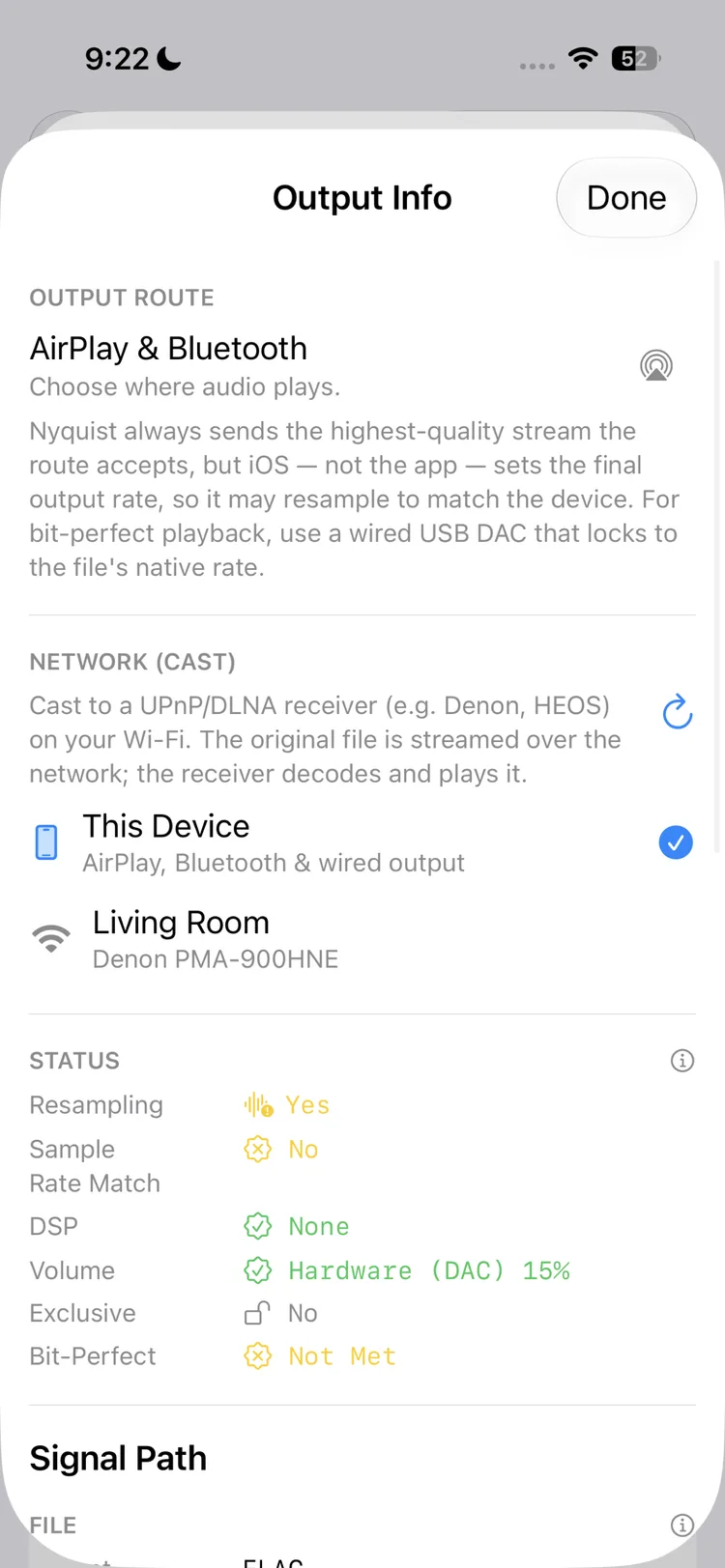
Output & network play Choose AirPlay, Bluetooth, wired output, or cast to a UPnP/DLNA receiver. -
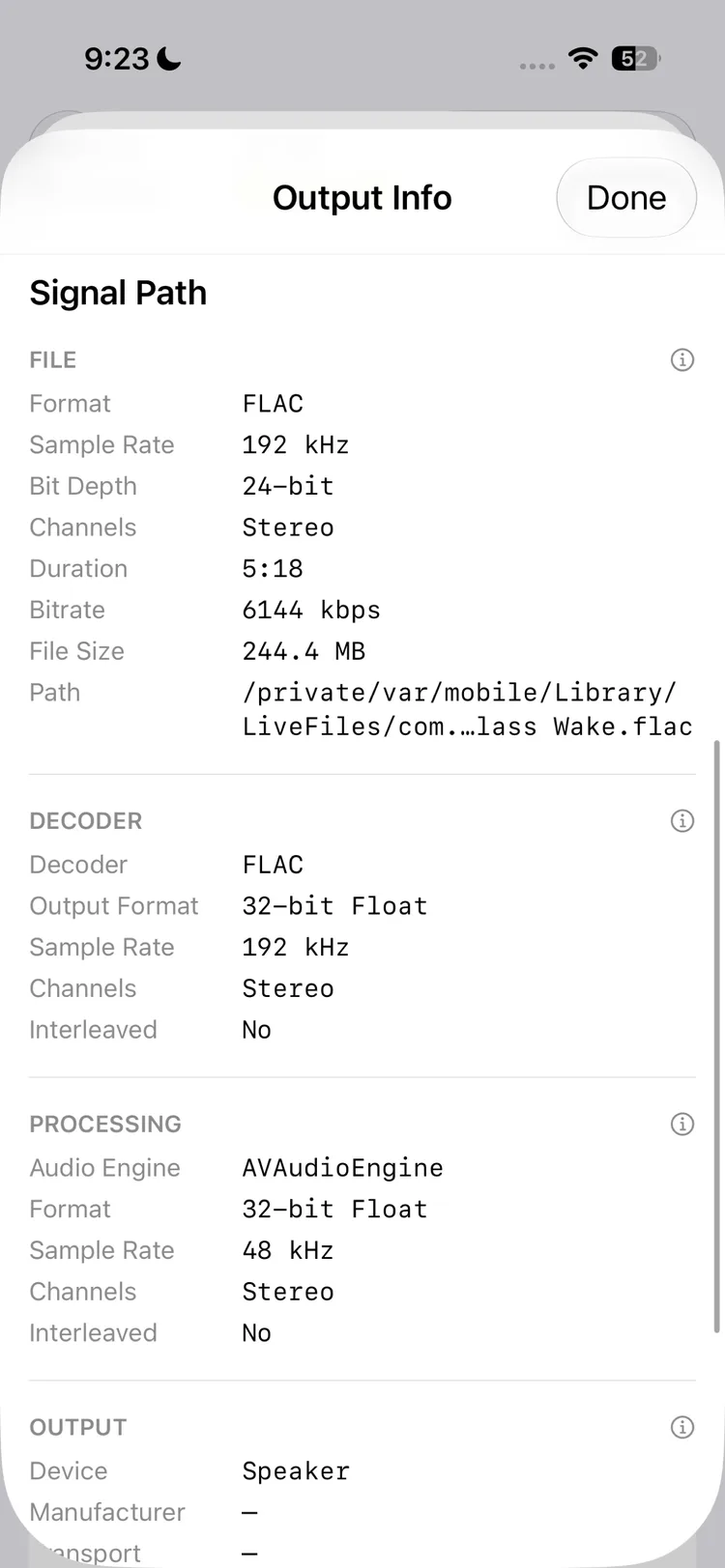
Signal path Follow the file through decoder, processing, and output, stage by stage. -
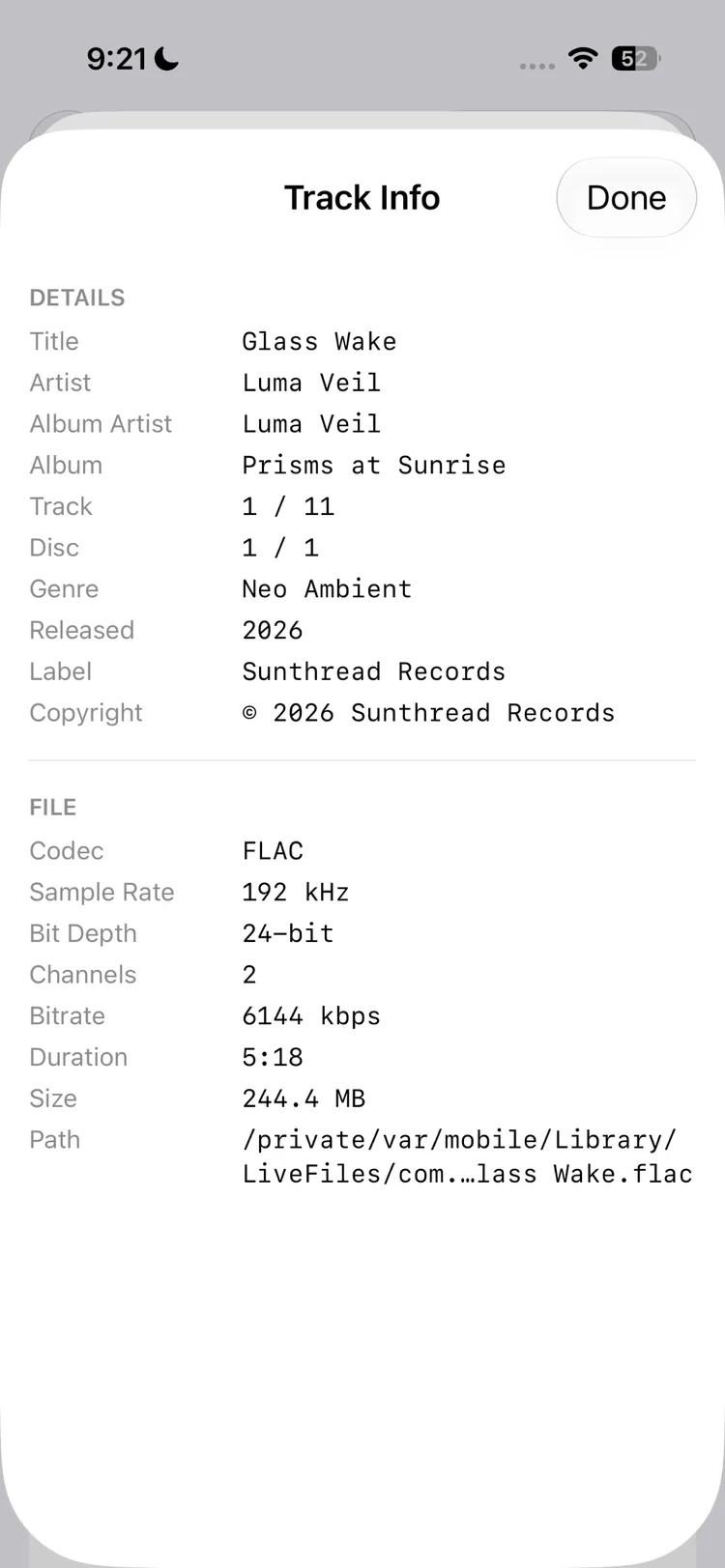
Track info Complete metadata and file details for every track. -
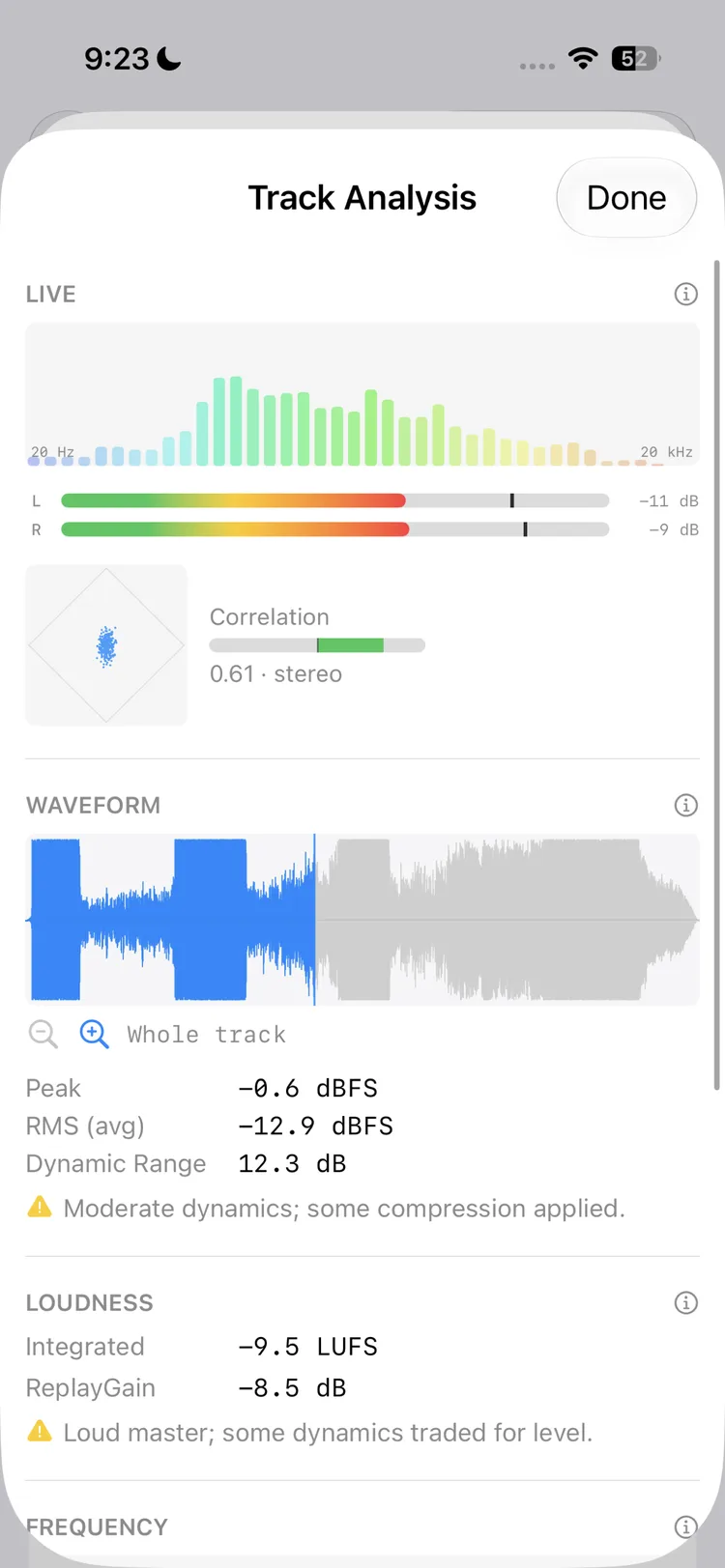
Track analysis Live spectrum, level meters, goniometer, waveform, and loudness. -
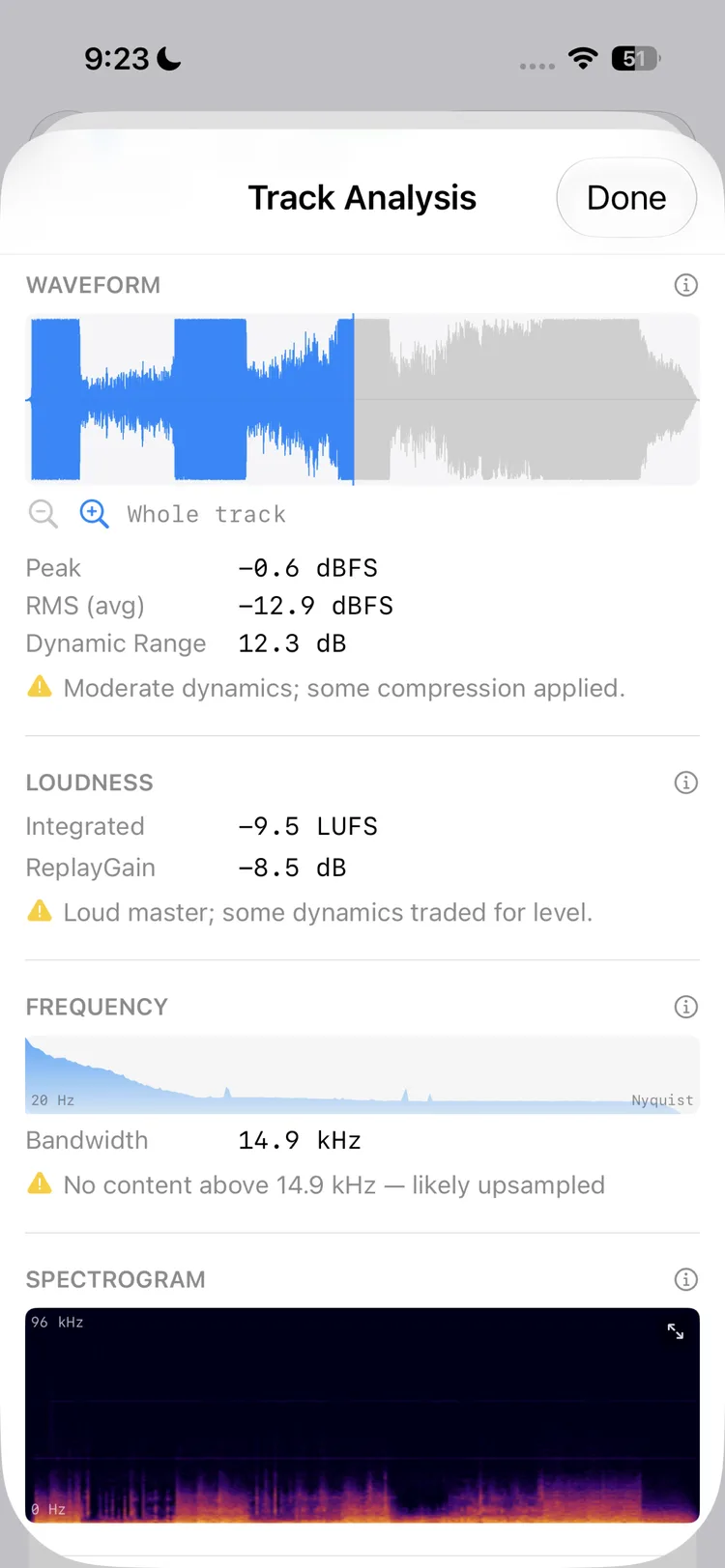
Waveform & loudness Peak, RMS, dynamic range, bandwidth, and a full spectrogram per file.
-
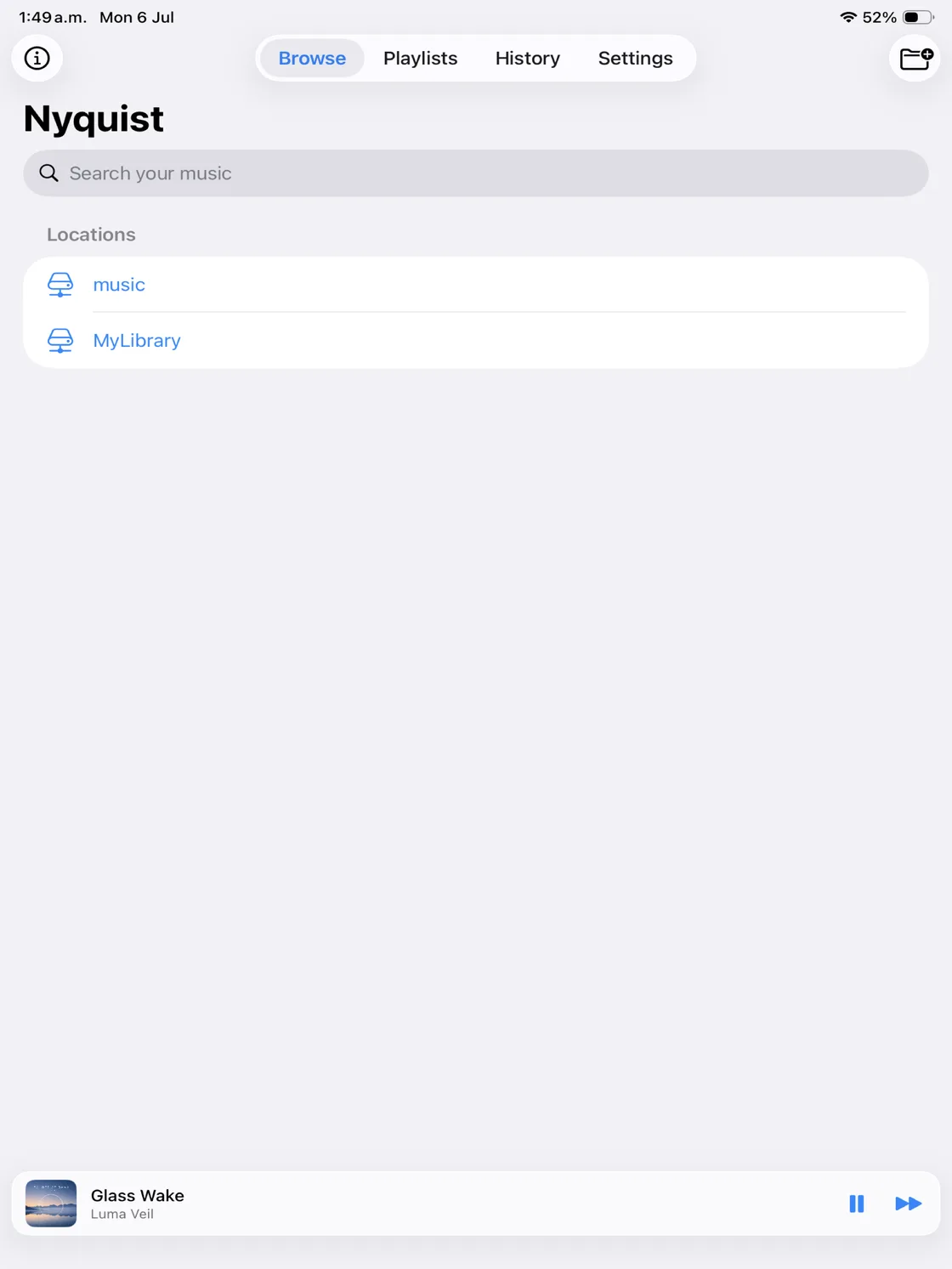
Your locations Saved local and NAS locations with instant search. -
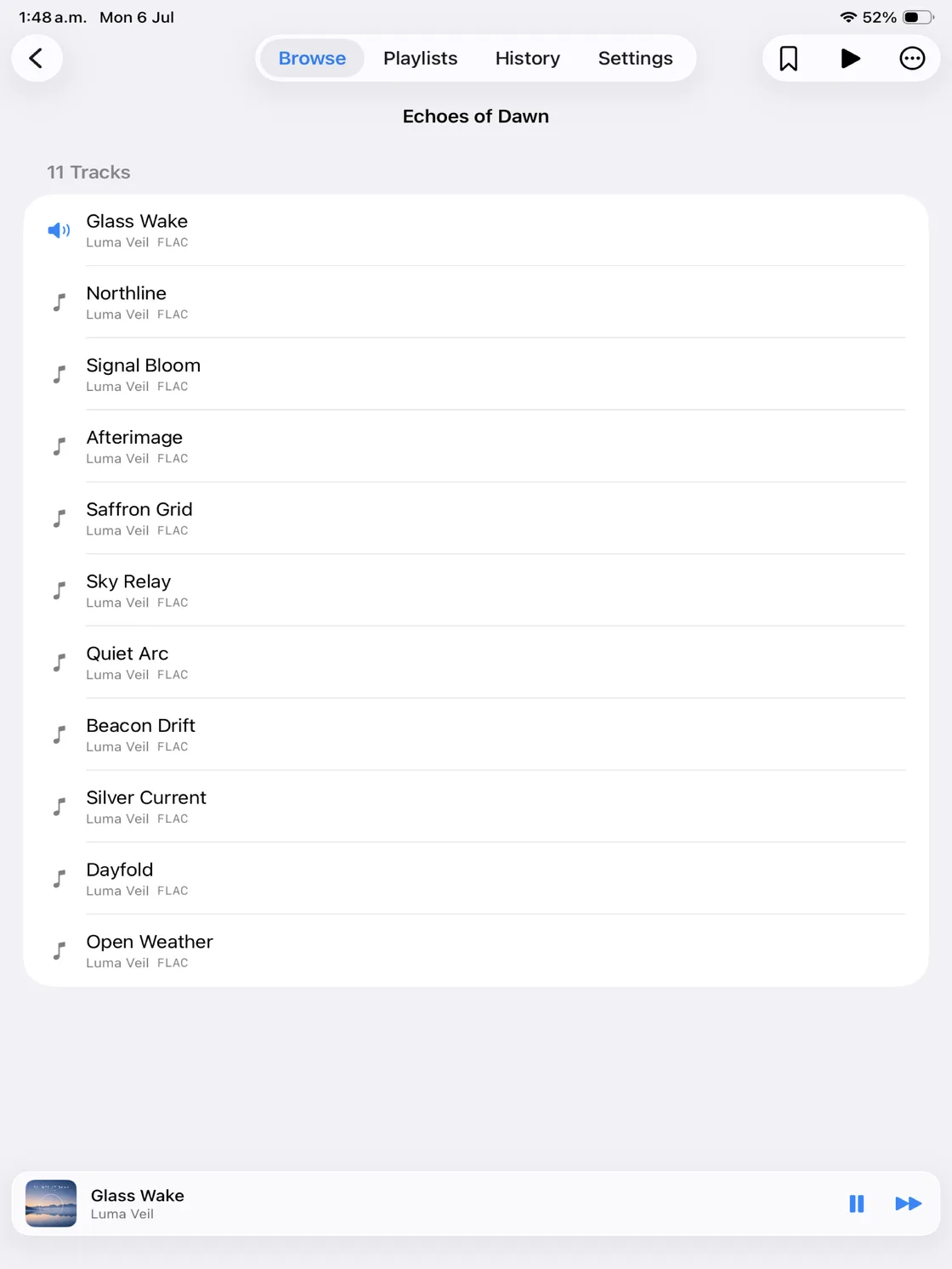
Folder-first browsing Album and folder navigation with a pinned mini player. -
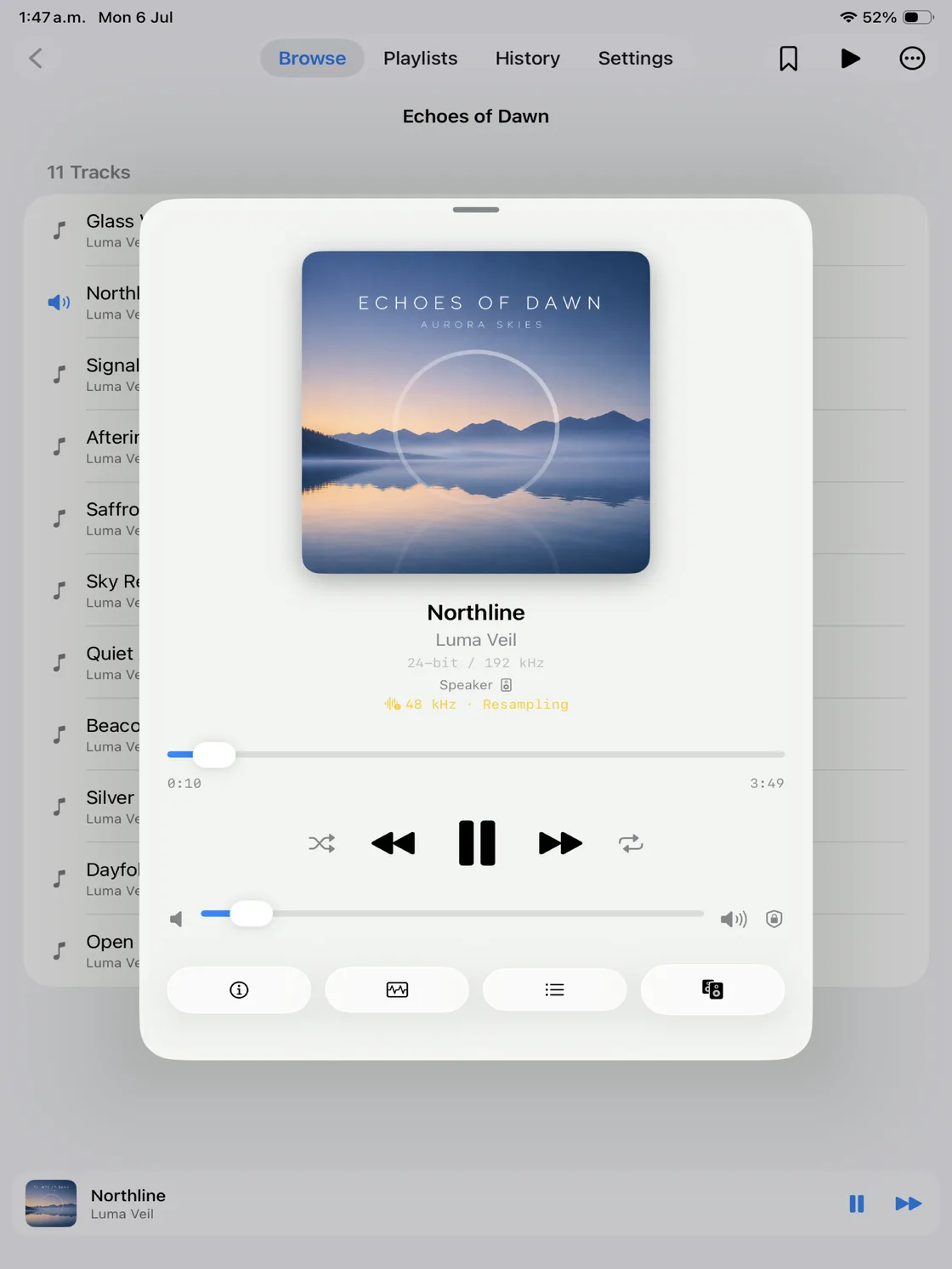
Now playing A full now-playing screen with output route and resampling status. -
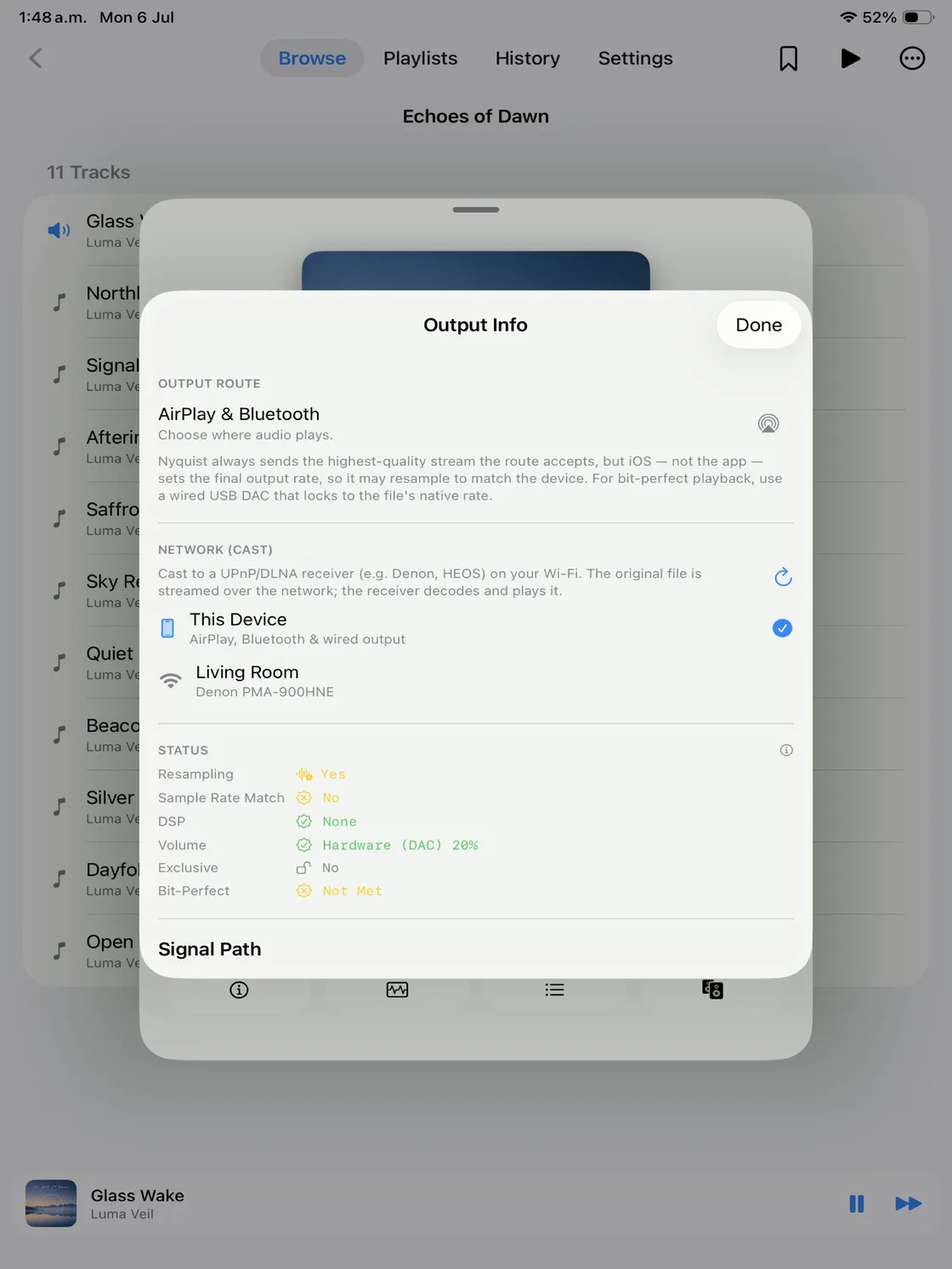
Output & network play Route to AirPlay, Bluetooth, wired, or cast to a network receiver. -
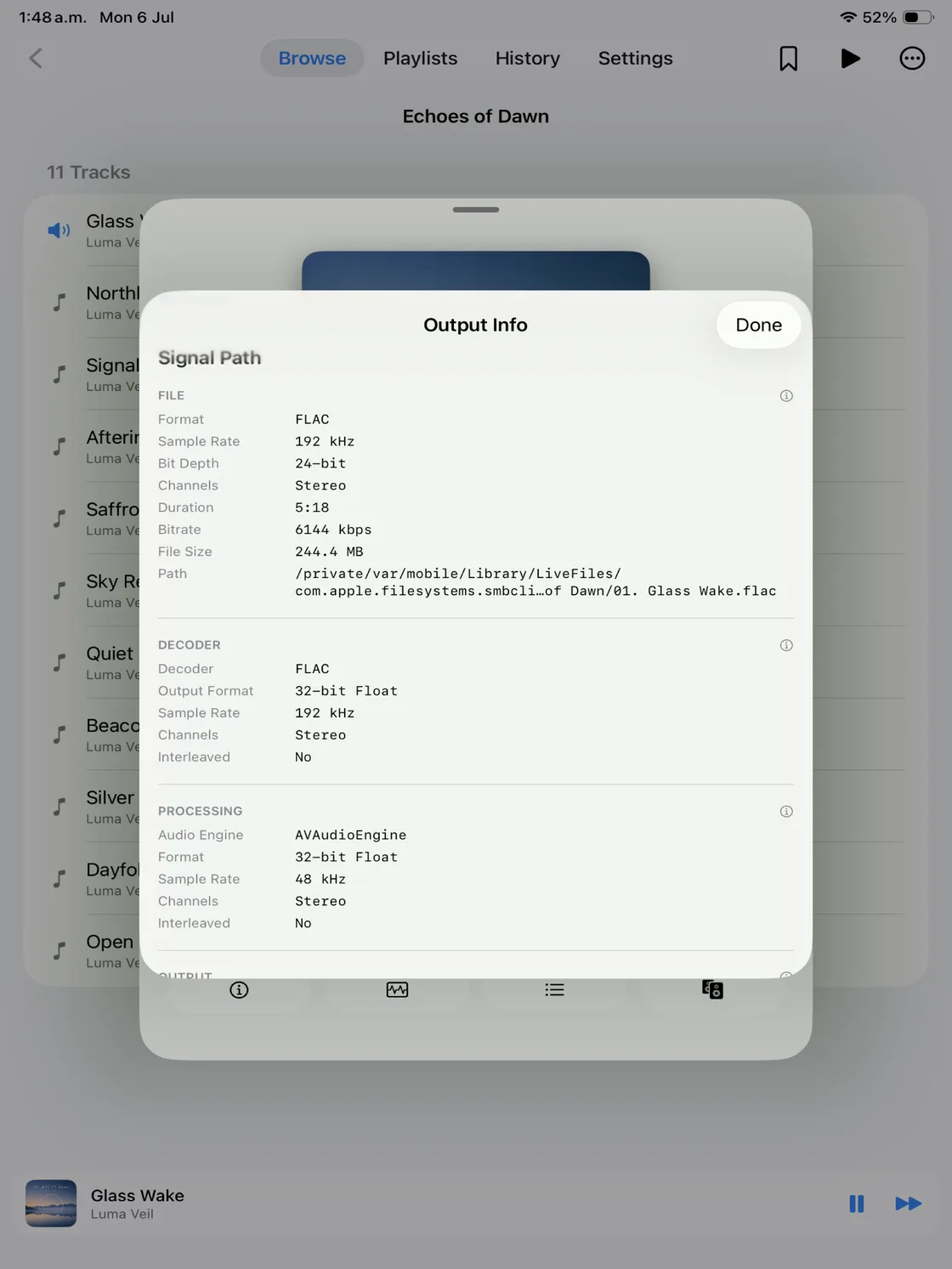
Signal path The full playback chain from file to output. -
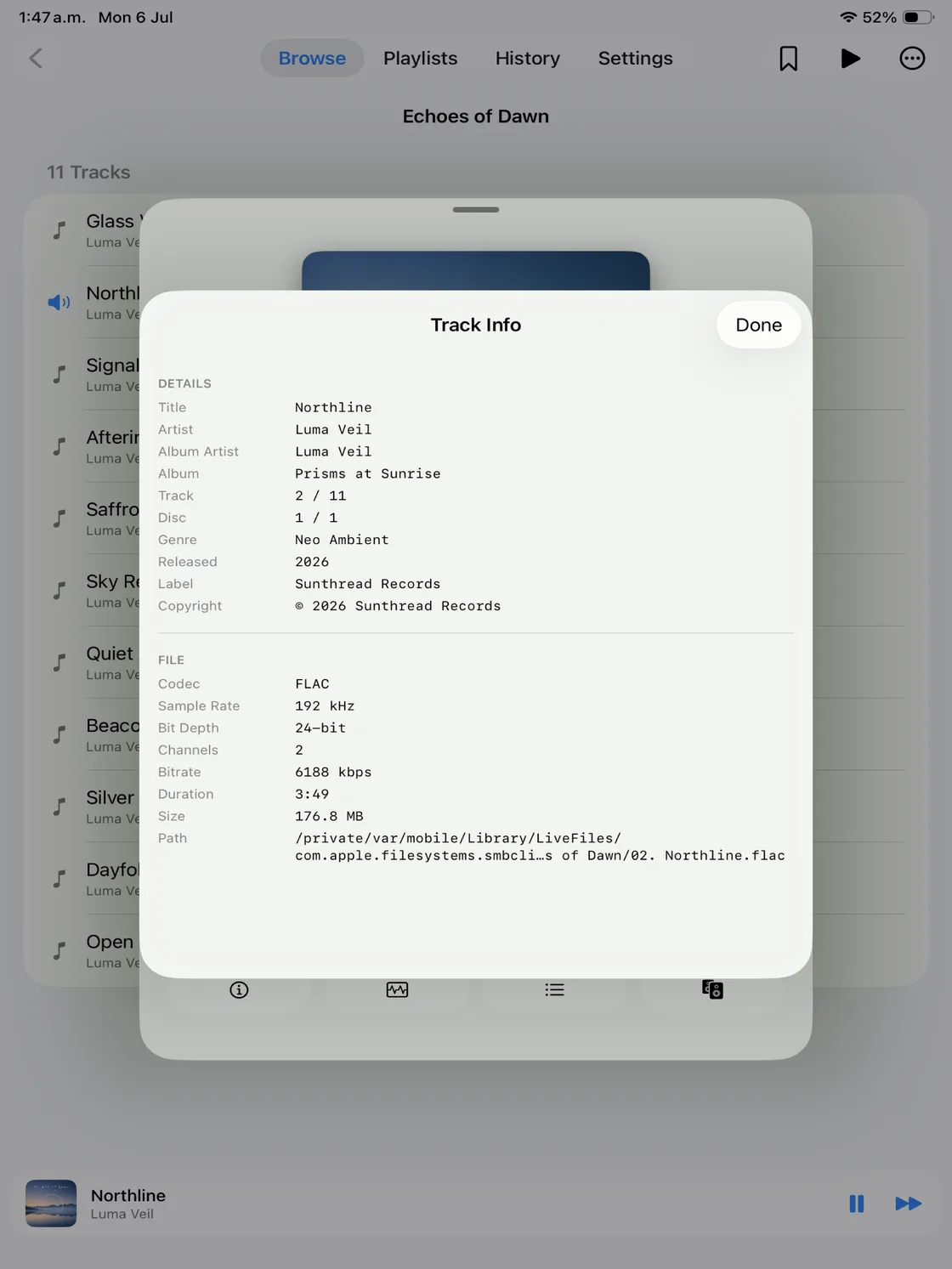
Track info Complete metadata and file details for every track. -
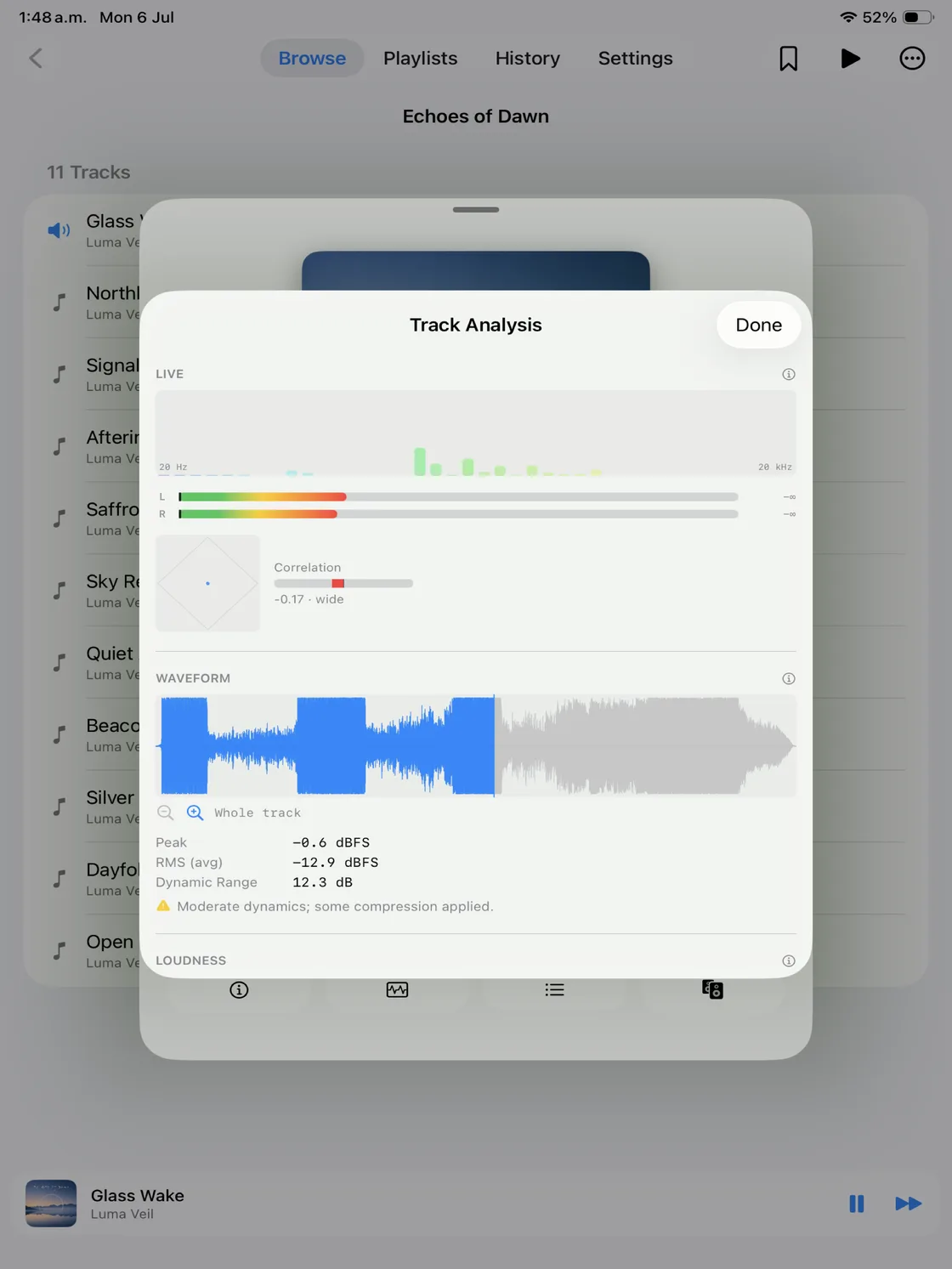
Track analysis Live spectrum, meters, waveform, and loudness. -
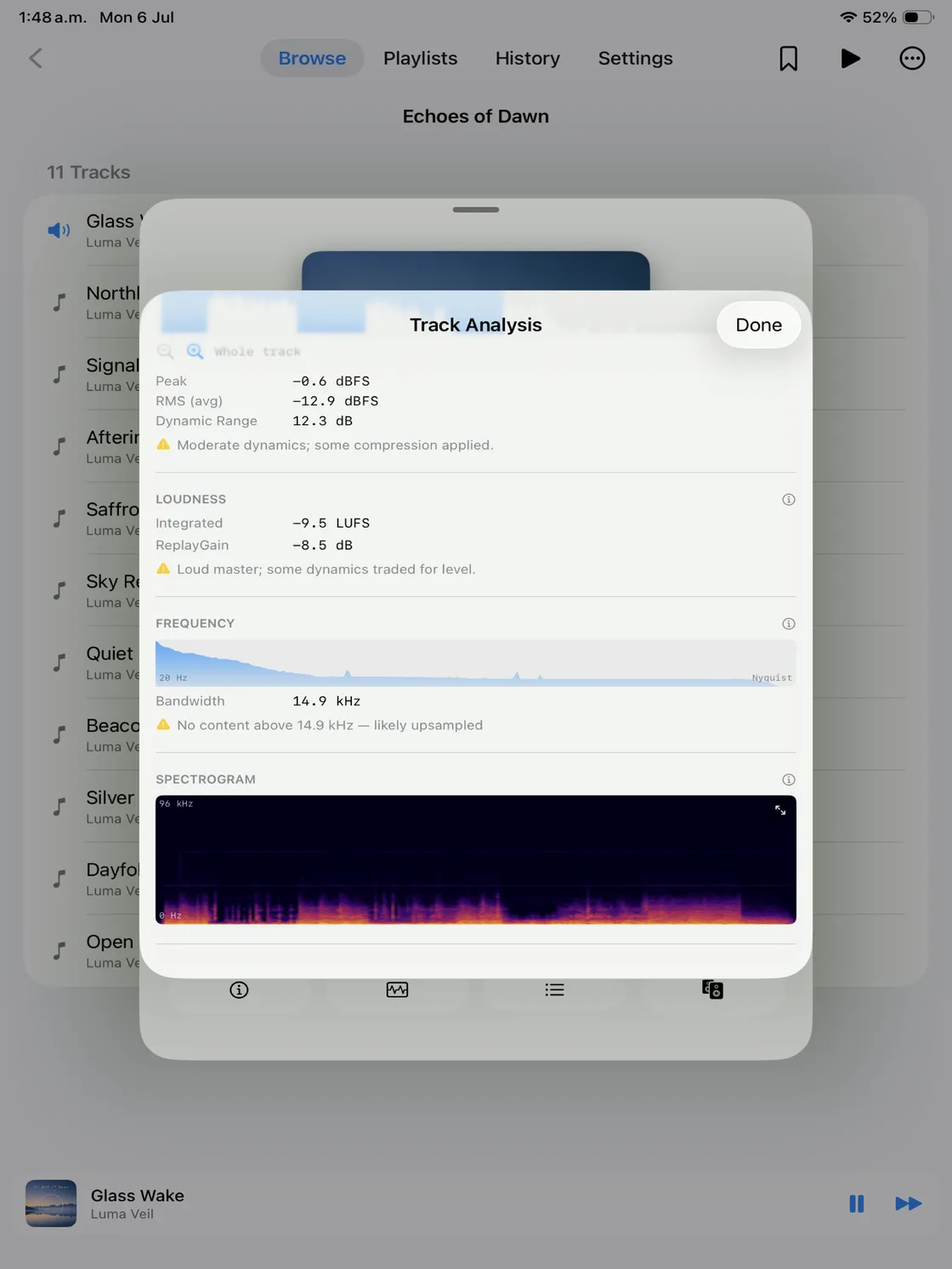
Waveform & loudness Peak, RMS, dynamic range, and a full spectrogram.
The signal path, honestly
Know exactly what happens to your audio.
Nyquist exposes the playback chain from source file to output device. See the source format, processing path, output rate, resampling state, and exclusive-mode status instead of relying on a blanket quality label.
On macOS, Nyquist asks a selected output device to match the file's sample rate, or a clean same-family multiple, and waits for the device clock to re-lock. The live status reports whether CoreAudio resampling was detected. Because the PCM engine mixes in 32-bit float, Nyquist does not claim provable bit-for-bit PCM identity end to end.
- Green — sample-rate matched; no resampling detected
- Yellow — resampling in effect
- Lock — exclusive (hog) mode active
Disk-streamed frame-by-frame, never decoded whole into RAM — so even 24/192 material stays light on resources.
Output limits
Why doesn't my output match the source?
The output device determines what can ultimately be delivered. Bluetooth, AirPlay, built-in speakers, and some network receivers may impose codec, format, or sample-rate limits. A compatible USB DAC gives the Mac more direct control over the digital output path and may support additional rates or bit depths; that technical difference is not a promise that every DAC sounds better.
Compare Bluetooth and USB audioTrack analysis
A laboratory for your music.
Inspect what is actually inside a recording. Analyze waveform, loudness, dynamic range, frequency spectrum, spectral bandwidth, and stereo position, with plain-language explanations alongside the numbers.
Whole-track analysis includes peak and RMS levels, EBU R128 loudness, ReplayGain, long-term spectrum, and a spectrogram. Live tools add level meters, a spectrum view, and a stereo goniometer.
Understand the audio signal path
Local drives and NAS
Built for huge libraries.
Browse by folder without importing everything into a database or waiting for a full-library scan.
Add local folders, external SSDs, or SMB shares. Nyquist starts a remote track while a background copy makes later seeks immediate, and prefetches the next track for a smoother hand-off.
How Nyquist works with a NAS
Private by design
Your music stays yours.
No accounts. No tracking. No cloud.
- No account or listening history
- No app analytics or advertising profile
- No cloud music library
- Files, metadata, and search index stay on your devices
This website is static too: it uses no analytics, marketing cookies, visitor identifiers, or third-party tracking scripts.
Read the privacy policyOne universal app. Mac, iPhone, iPad & Apple TV.
The library stays familiar across devices, but output control is intentionally platform-specific.
| Capability | macOS | iPhone / iPad | Apple TV |
|---|---|---|---|
| Local files | Supported | Supported | Supported |
| NAS / SMB | Supported | Supported | Supported |
| USB DAC | Direct device selection | Wired, system-controlled | Not available |
| Sample-rate matching | Selected device | System-managed | System-managed |
| Exclusive mode | Supported | Not available | Not available |
| Local DSD | DoP to a compatible DAC | Not available | Not available |
| AirPlay | macOS Control Center | System route picker | System-managed |
| UPnP / DLNA | Supported | Supported | Supported |
Requires macOS 14.6 on Apple Silicon, iOS or iPadOS 17.6, or tvOS 17.0 or later. USB and network capabilities still depend on the connected device's supported formats and rates.
Frequently asked questions
Is Nyquist a streaming service?
No. Nyquist plays music files you already own from local drives, external SSDs, and NAS shares. It has no catalog, subscription, recommendation feed, or streaming account.
What is a lossless music player?
It decodes lossless formats such as FLAC and ALAC without discarding audio information. Lossless describes the file's compression, not its sample rate, mastering quality, or the behavior of every output device.
Can I play FLAC files on Mac?
Yes. Nyquist plays FLAC on Apple Silicon Macs, including files on local disks, external drives, and NAS shares. It shows the file's sample rate, bit depth, channels, metadata, and available track analysis.
Which audio formats does Nyquist support?
FLAC; AAC, ALAC, or PCM in MPEG-4 Audio; MP3; AIFF and AIFC; WAV and Wave64; CAF; AU and SND; AAC and ADTS; Ogg with Vorbis, Opus, or FLAC; and DSD in DSF and DFF files. See the audio format guide for extensions, local playback, network delivery, and platform limits.
Can Nyquist play music directly from a NAS?
Yes. Add an SMB share directly or choose a mounted share through Files. Nyquist browses it by folder, starts remote playback while caching locally, and prefetches the next track. No full library import is required.
What is gapless playback?
Gapless playback moves between consecutive tracks without an artificial pause. Nyquist pre-schedules same-format tracks on a shared playback node. A format change uses a normal hand-off, and network playback also depends on receiver support.
Does Nyquist support 24-bit / 192 kHz audio?
Yes, when the file can be decoded and the selected output path supports it. Nyquist exposes the real sample rate and bit depth. Those numbers describe the file and path; they do not by themselves prove a better recording or master.
Does Nyquist resample audio?
On macOS, Nyquist tries to match the selected device's nominal rate to the file, or a clean same-family multiple, and reports whether CoreAudio resampling is detected. On iPhone, iPad, and Apple TV, the operating system controls more of the final route.
Can Nyquist use a USB DAC?
Yes. On macOS, choose a specific CoreAudio device, enable sample-rate matching, and optionally use exclusive mode. A wired DAC can also be used with a compatible iPhone or iPad, but iOS and iPadOS manage the route and provide less direct output control.
What does bit-perfect audio mean in Nyquist?
Strictly, bit-perfect means the original digital samples reach the output unchanged. Nyquist can show sample-rate matching and the absence of detected PCM resampling, but its 32-bit float mixer prevents a claim of provable end-to-end PCM bit identity. DSD over PCM preserves the DSD payload for compatible DACs.
How does Nyquist play DSD?
On macOS, compatible USB DACs receive DSF or DFF audio through DSD over PCM. Compatible UPnP/DLNA receivers receive the original file without transcoding. Local DSD playback is not available on iPhone, iPad, or Apple TV.
Does Bluetooth support bit-perfect playback?
Nyquist does not label Bluetooth as bit-perfect. Bluetooth routes commonly encode audio for transport, and the codec and final processing are controlled by the operating system and receiving device.
Does AirPlay preserve the original sample rate?
Not in every setup. AirPlay format handling depends on the sender, protocol version, and receiving device, so Nyquist does not promise the source rate reaches every AirPlay output unchanged. On Mac, choose AirPlay in Control Center; on iPhone and iPad, use the system route picker.
Can Nyquist play to a Denon, HEOS, or other network receiver?
Yes. Nyquist discovers compatible UPnP/DLNA receivers and sends the original file without transcoding. The receiver determines whether it supports that container and codec and what processing happens afterward. Gapless hand-off works where supported.
Can Nyquist identify questionable hi-res files?
Track analysis can reveal evidence such as limited spectral bandwidth or a sharp high-frequency cutoff. That can suggest upsampling or a lossy source, but it is evidence to interpret, not an infallible test of a file's history.
Does Nyquist work without an account?
Yes. There is no sign-in, subscription, cloud library, or listening profile. Install the app, grant access to a folder, and play your files.
Does Nyquist collect my music library?
No. Your files, metadata cache, library topology, playlists, and search index stay on your devices or in folders you choose. The app contains no analytics or advertising trackers, and this website has no visitor analytics or tracking scripts.
What do I need to run Nyquist?
An Apple Silicon Mac with macOS 14.6 or later, an iPhone or iPad with iOS or iPadOS 17.6 or later, or Apple TV with tvOS 17.0 or later. A USB DAC and network receiver are optional.
Hear your library the way it was recorded.
Download Nyquist for gapless playback, fast folder browsing, and a transparent signal path across your Apple devices.
Download on the App StoreFree · No account · No tracking